Persistent DNS TXT
Persistent DNS TXT is a DigiCert DCV method: you publish one DNS TXT record at _validation-persist.example.com (for the name example.com), copy the TXT value from CertCommand exactly, and leave that record published. Later DigiCert and GeoTrust checks can reuse the same hostname and URI instead of a new random token on every order. That label is separate from your zone apex—SPF and other TXT records at example.com stay untouched.
Use it when you can create DNS TXT records for the names on the certificate and can leave that record in place. Shorter public TLS lifetimes mean more issuances—and more DCV. Persistent DNS TXT does not skip validation; it removes the repeated token work.
DigiCert and GeoTrust only. Persistent DNS TXT is not offered for Sectigo or PositiveSSL. Use DNS CNAME, email, or HTTP file DCV instead. IP-address names still use HTTP file DCV only. ACME HTTP-01 and DNS-01 remain a separate workflow.
1. Choose Persistent DNS TXT on the request
On a new certificate request or reissue in CertCommand, under Prove control over your domain, open the DCV method dropdown and select Persistent DNS TXT.
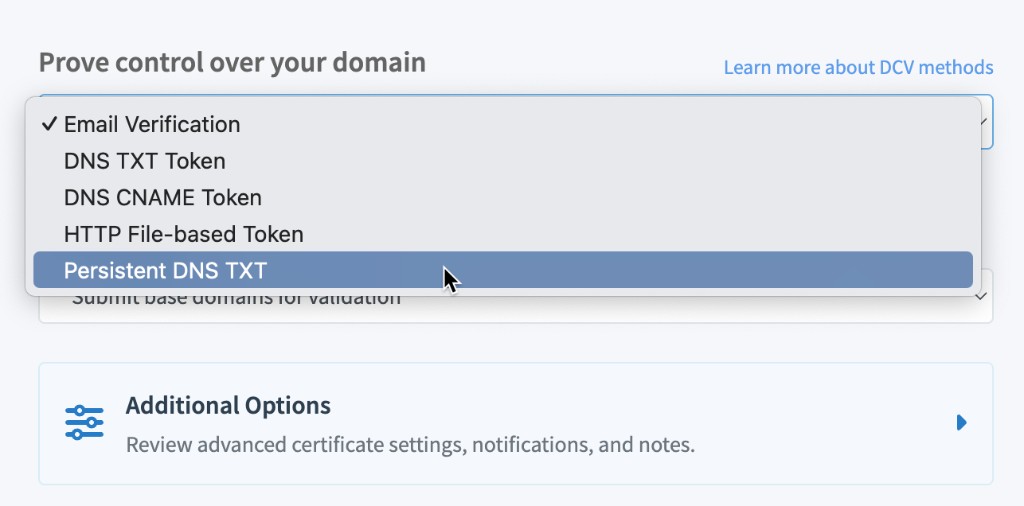
Available choices may be limited by the product type or the names on the order. If Persistent DNS TXT is missing, the brand or name mix does not support it.
On DV orders, one DCV method applies to every domain on the certificate. Each name still needs its own record—for example _validation-persist.example.com and _validation-persist.www.example.com.
2. Copy TXT host and TXT value
After you submit (or on the pending order’s DCV Method panel), copy TXT host and TXT value with Click Text to Copy. Do not edit them.
CertCommand’s TXT host is the full name for that domain—for example _validation-persist.example.com or _validation-persist.www.example.com. Copy that string. (If your panel still shows only _validation-persist, the name you must publish is still _validation-persist.<that domain>.)
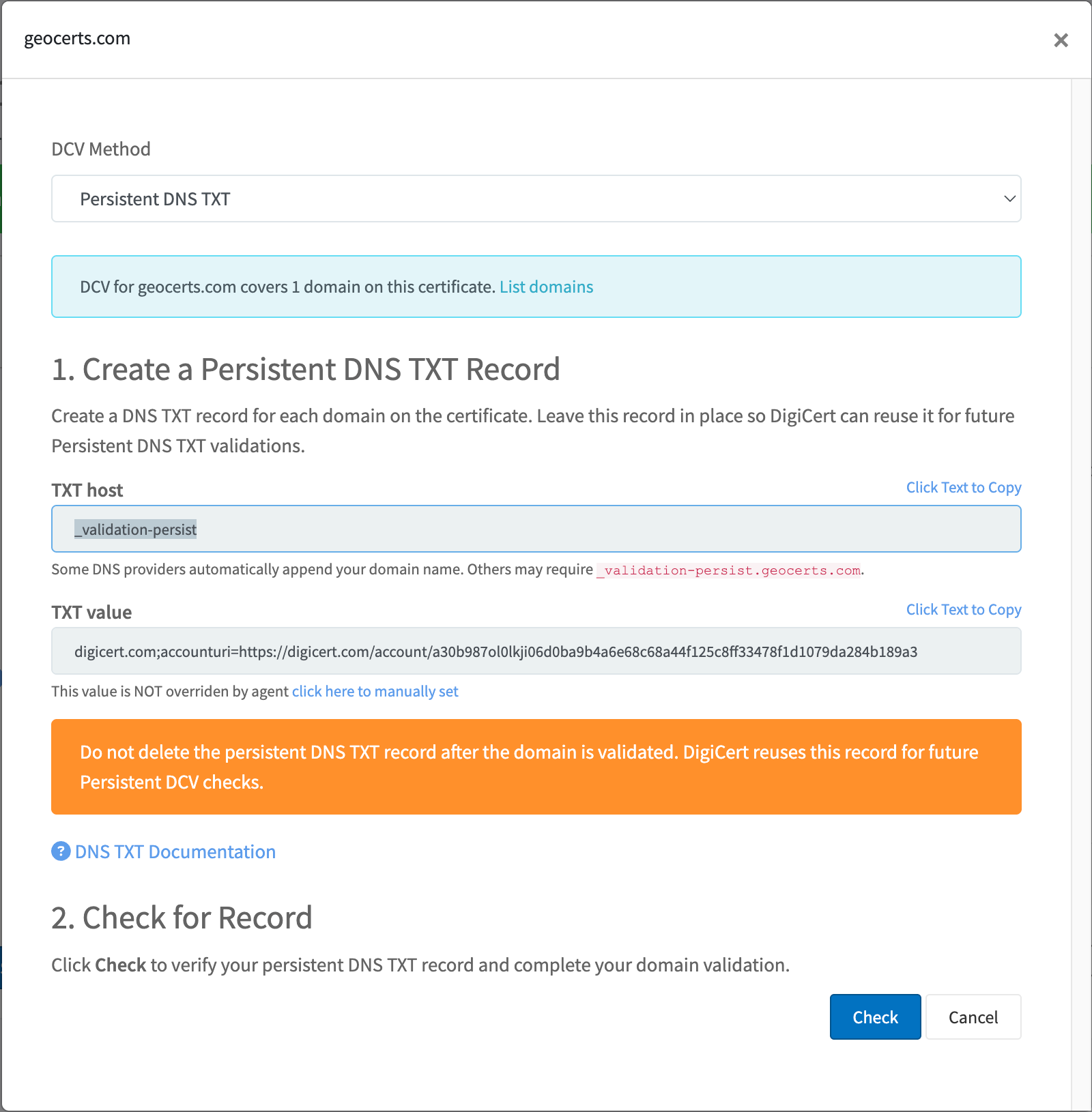
| Field | What to publish |
|---|---|
| TXT host | _validation-persist.example.com (the FQDN CertCommand copies) |
| TXT value | The persistent URI, shaped like digicert.com;accounturi=https://digicert.com/account/… |
Copy TXT value exactly: no extra quotes, spaces, or line breaks. There is no space after the semicolon.
Do not paste the full host if your DNS UI already appends the zone. Copying _validation-persist.example.com into a Name field that also adds example.com creates _validation-persist.example.com.example.com and validation fails. In that UI, enter only _validation-persist. If the provider does not append the zone, paste the full FQDN from CertCommand.
Do not delete this record after the domain is validated. DigiCert reuses the same hostname and URI for later Persistent DNS TXT checks. On the next request or reissue, select Persistent DNS TXT again—other methods will not look for this record.
3. Create the DNS TXT record
At your DNS provider, create a TXT record for each domain on the certificate. The CA looks up the FQDN:
_validation-persist.example.com. TXT "digicert.com;accounturi=https://digicert.com/account/<your-uri>"
In a typical provider form (zone already example.com):
Name:  _validation-persist
Type:  TXT
Value: digicert.com;accounturi=https://digicert.com/account/<your-uri>
Use the provider default TTL unless you have a reason to set a short one while you wait for the first check.
Confirm the FQDN is public:
dig +short TXT _validation-persist.example.com
You should see the persistent URI. DigiCert checks from multiple network locations (MPIC). Confirm the TXT is visible worldwide with a public resolver , not only your DNS provider’s UI.
4. Check (optional)
You do not have to click Check. DigiCert polls DNS periodically and completes validation when the record is public. Click Check only if you want an immediate lookup.
Success in CertCommand: the domain shows as validated (and DV orders show progress such as “N of M domains validated”).
Persistent DNS TXT vs DNS TXT token
| Persistent DNS TXT | DNS TXT token | |
|---|---|---|
| Host | _validation-persist.example.com |
_dnsauth.example.com |
| Value | Persistent URI (does not rotate like a token) | Random token |
| After success | Leave published | Often removed |
| Next order | Select Persistent DNS TXT again | New token |
If you only need a one-time DNS change, see DNS TXT token.
Troubleshooting
If validation does not complete, confirm the TXT record is publicly resolvable and matches TXT host and TXT value in CertCommand. You can wait for DigiCert’s next poll, or click Check for an immediate retry.
| Issue | What to check |
|---|---|
| Record on the wrong hostname | Publish at _validation-persist.example.com for example.com. Copy TXT host from CertCommand. If your DNS UI appends the zone, enter only _validation-persist. |
| Hostname omitted or misspelled | Include the leading underscore: _validation-persist. |
| Doubled zone | Pasting _validation-persist.example.com into a UI that also appends example.com creates _validation-persist.example.com.example.com. |
| Wrong DCV scope | On the request, Submit base domains expects _validation-persist.example.com. Submit exact domain names expects the full name (for example _validation-persist.sub.example.com). A record at the apex can satisfy FQDN scope; a record only at the FQDN cannot satisfy base-domain scope. |
| Extra characters in the TXT value | The value must be only the persistent URI—no quotes, spaces, or line breaks. No space after ;. |
| URI copied incorrectly | Use Click Text to Copy. Do not edit the URI. |
| DNS not visible yet | Wait for propagation |
| . DigiCert will poll again; Check is only for an instant retry. | |
| Wrong product | Persistent DNS TXT is DigiCert and GeoTrust only. Sectigo and PositiveSSL use the other DCV methods. |
| Record deleted after issuance | Publish it again and select Persistent DNS TXT on the next request. |
For email, HTTP file, CNAME, and mixed-method issues, see Troubleshooting & FAQs.