Multi-Perspective Issuance Corroboration (MPIC)
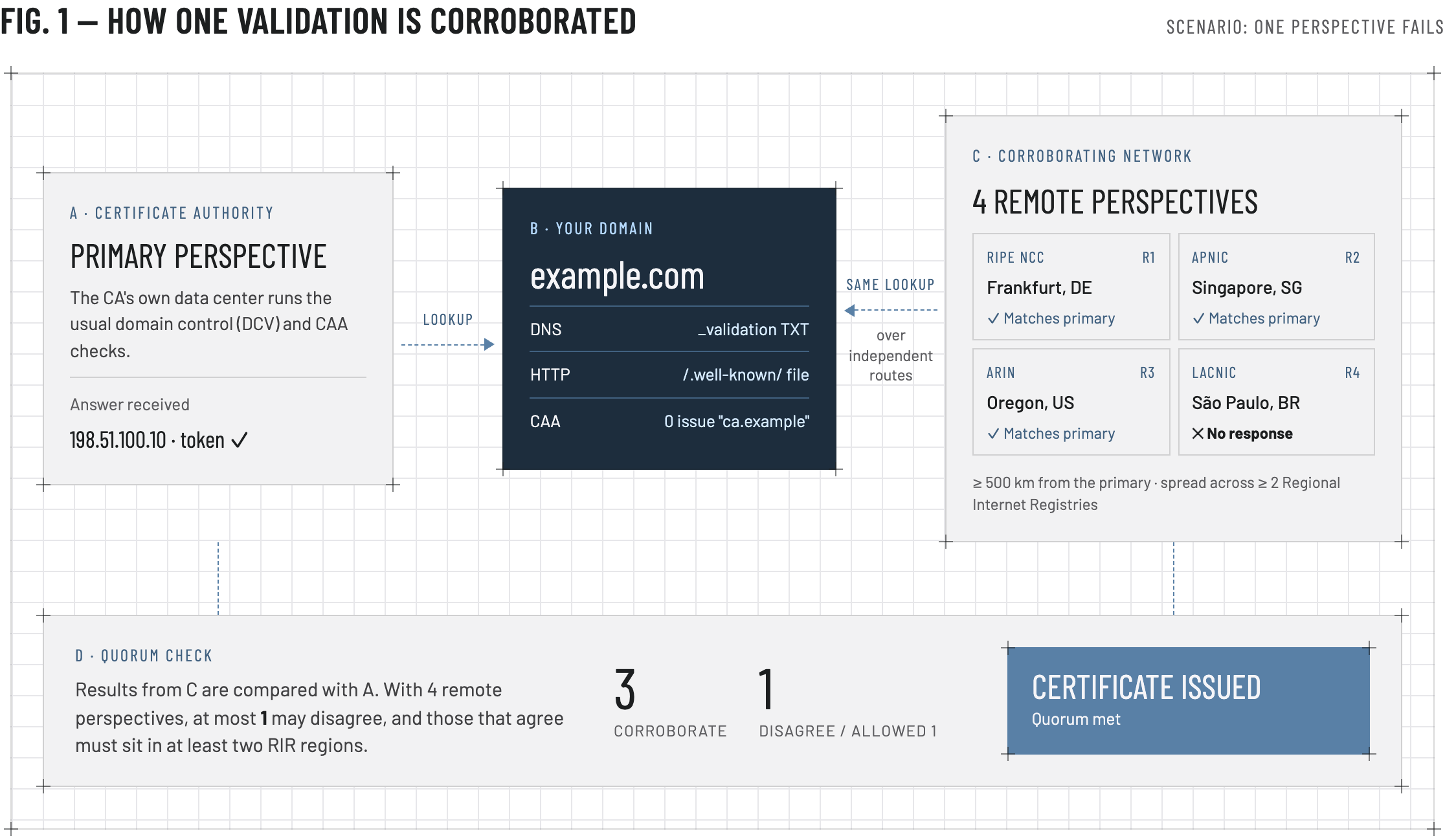
Multi-Perspective Issuance Corroboration (MPIC) is a CA/Browser Forum requirement for publicly trusted TLS certificates. Before issuing a certificate, the certificate authority (CA) corroborates domain control validation (DCV) and DNS Certification Authority Authorization (CAA) results from multiple independent network locations.
What the issuing CA checks
What the CA corroborates depends on the DCV method for each domain. MPIC applies to:
- DNS TXT or CNAME DCV — checks that enough independent networks receive the same TXT, or CNAME answer from the domain’s authoritative nameservers as the CA’s primary lookup.
- HTTP File-based DCV — checks that enough independent networks receive the same token from the validation URL as the CA’s primary request.
- CAA checks — checks that enough independent networks receive the same CAA answer from the authoritative nameservers as the CA’s primary lookup. Whether those records authorize the issuing CA is a separate check, described below.
The issuing CA performs these checks, including ACME validations. You do not select the network perspectives or submit a separate MPIC request.
How corroboration works
Tips and tools for DNS validation
For DNS TXT, DNS CNAME, Persistent DNS TXT, and ACME DNS-01:
- Publish the record at the exact hostname from CertCommand. Those names often start with an underscore (
_dnsauth,_validation-persist,_acme-challenge). - Copy the token exactly, including a leading underscore when CertCommand shows one. A value such as
_lgb8gd04i6u1t8u6fuol5mgahiar34must keep that opening_. - Every authoritative nameserver must return that same value.
Check worldwide propagation. The record can look correct in your DNS provider's control panel and still be missing from resolvers elsewhere. That is a common cause of a failed DNS check under MPIC.
Use a propagation checker such as the whatsmydns.net DNS Propagation Checker as a helper. Choose TXT or CNAME, enter the exact hostname from CertCommand, and confirm the expected value appears at most resolvers before you retry. A service like this queries public resolvers. It is not an authoritative nameserver, and it is not the CA's MPIC check. A clean result is a useful signal, not proof that issuance will succeed.
If DNSSEC is enabled, it must also validate correctly for DigiCert, GeoTrust, Sectigo, and PositiveSSL. A broken DNSSEC chain can prevent DCV and CAA lookups even when the record appears in your DNS provider’s interface. DigiCert’s implementation date is in DNSSEC validation for domain control and CAA checks.
Tips and tools for HTTP validation
For HTTP file validation and ACME HTTP-01, serve the token at the exact hostname and path from CertCommand. Copy the token exactly, including a leading underscore when CertCommand shows one. A value such as _lgb8gd04i6u1t8u6fuol5mgahiar34 must keep that opening _. Every server, load balancer target, and CDN origin must return that same token. Check redirects and rate limits.
Check worldwide HTTP reachability. The token URL can load in your browser and still be blocked from other countries or regions.
Use a reachability checker such as the Emercom HTTP Check as a helper. It requests the URL from 22 servers across 12 countries. Enter the exact validation URL from CertCommand. As with a DNS propagation checker, this service is not the CA's MPIC check, and a clean result is not proof that issuance will succeed.
Tips and tools for CAA checks
DNS CAA records tell certificate authorities which CAs may issue certificates for a domain. You do not have to publish them. If no CAA records exist, the issuing CA can still issue the certificate.
If you do publish CAA records, authorize the CA for that order:
- Authorize DigiCert (digicert.com) for a DigiCert or GeoTrust order
- Authorize Sectigo (sectigo.com) for a Sectigo or PositiveSSL order
That authorization check is separate from MPIC. MPIC checks that the perspectives return the same CAA result: the same records, or the same answer that no CAA records exist. A CNAME or other delegation can produce a conflicting CAA answer.
Check worldwide propagation. Use a propagation checker such as the whatsmydns.net DNS Propagation Checker . Choose CAA and confirm the expected records, or the absence of CAA records, at most resolvers. The same limit applies: it is a helper, not the CA's MPIC check.
Allow MPIC validation traffic
Most orders never need the addresses or User-Agent strings below. Use them only when a firewall, allowlist, or regional restriction blocks the CA from querying your DNS or opening the validation URL.
For DigiCert and GeoTrust orders, DNS TXT, DNS CNAME, and CAA checks need the IP addresses below. HTTP file validation can use those addresses or both of these User-Agent strings:
DigiCert DCV/1.1DigiCert DCV Bot/1.1
The User-Agent option works when the firewall or web application firewall can match an HTTP request header.
DigiCert can add agent IP addresses at any time. This table is a copy of DigiCert’s MPIC agent list as of September 23, 2026. Check that page for addresses added since then.
| Effective date | IP address | Location |
|---|---|---|
| August 17, 2026 | 13.232.96.181 | India |
| June 18, 2026 | 54.169.250.231 | Singapore |
| June 18, 2026 | 18.166.173.162 | Hong Kong |
| June 18, 2026 | 56.228.59.9 | Sweden |
| February 24, 2026 | 52.78.185.62 | South Korea |
| February 24, 2026 | 52.197.215.146 | Japan |
| September 1, 2025 | 18.193.239.14 | Germany |
| September 1, 2025 | 52.17.48.104 | Ireland |
| September 1, 2025 | 202.65.16.4 | Netherlands |
| September 1, 2025 | 13.58.90.0 | United States |
| September 1, 2025 | 54.185.245.130 | United States |
| September 1, 2025 | 54.241.89.140 | United States |
| September 1, 2025 | 54.227.165.213 | United States |
| September 1, 2025 | 216.168.240.4 | United States |
| September 1, 2025 | 216.168.247.9 | United States |
Sectigo and PositiveSSL. Sectigo has not published an IP list or a User-Agent string. For Sectigo and PositiveSSL orders, leave HTTP validation endpoints open and do not filter them by User-Agent, IP address, or region. See Sectigo's MPIC FAQ .
If validation still fails
Contact GeoCerts support with the order ID or domain and we’ll help you sort it out.
References
- DigiCert: Multi-Perspective Issuance Corroboration for Digital Certificates
- DigiCert: Using MPIC to Verify Domain Control and Perform CAA Checks
- Sectigo: MPIC FAQ
← Back to Domain Control Validation (DCV)